

LOGO challenge 1 - star square


Can you use LOGO to create this star pattern made from squares. Only basic LOGO knowledge needed.
First forward into Logo 3: repeat REPEAT
More Logo for beginners. Now learn more about the REPEAT command.
LOGO challenge 3 - star square
Creating designs with squares - using the REPEAT command in LOGO. This requires some careful thought on angles
LOGO challenge 9 - overlapping polygons
This LOGO challenge starts by looking at 10-sided polygons then generalises the findings to any polygon, putting particular emphasis on external angles
LOGO challenge 2 - diamonds are forever
The challenge is to produce elegant solutions. Elegance here implies simplicity. The focus is on rhombi, in particular those formed by jointing two equilateral triangles along an edge.
LOGO challenge 8 - rhombi
Explore patterns based on a rhombus. How can you enlarge the pattern - or explode it?

LOGO challenge - the humble square
Look at how the pattern is built up - in that way you will know how to break the final pattern down into more manageable pieces.
First forward into Logo 2: polygons
This is the second in a twelve part introduction to Logo for beginners. In this part you learn to draw polygons.

First forward into Logo 4: circles
Learn how to draw circles using Logo. Wait a minute! Are they really circles? If not what are they?
First forward into Logo 5: pen up, pen down
Learn about Pen Up and Pen Down in Logo
First forward into Logo 1: square five
A Short introduction to using Logo. This is the first in a twelve part series.
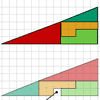
Muggles, Logo and gradients
Logo helps us to understand gradients of lines and why Muggles Magic is not magic but mathematics. See the problem Muggles magic.

Programming: Moiré patterns
We need computer programmers! Logo is a great entry-level programming language - and you can create stunning graphics while you learn.
First forward into Logo 11: sequences
This part introduces the use of Logo for number work. Learn how to use Logo to generate sequences of numbers.
LOGO challenge 5 - patch
Using LOGO, can you construct elegant procedures that will draw this family of 'floor coverings'?
First forward into Logo 12: puzzling sums
Can you puzzle out what sequences these Logo programs will give? Then write your own Logo programs to generate sequences.
LOGO challenge 10 - circles
In LOGO circles can be described in terms of polygons with an infinite (in this case large number) of sides - investigate this definition further.
LOGO challenge 4 - squares to procedures
This LOGO Challenge emphasises the idea of breaking down a problem into smaller manageable parts. Working on squares and angles.
First forward into Logo 10: count up - count down
What happens when a procedure calls itself?
LOGO challenge 11 - more on circles
Thinking of circles as polygons with an infinite number of sides - but how does this help us with our understanding of the circumference of circle as pi x d? This challenge investigates this relationship.
LOGO challenge 12 - concentric circles
Can you reproduce the design comprising a series of concentric circles? Test your understanding of the realtionship betwwn the circumference and diameter of a circle.
LOGO challenge 6 - triangles and stars
Recreating the designs in this challenge requires you to break a problem down into manageable chunks and use the relationships between triangles and hexagons. An exercise in detail and elegance.

Making Moiré patterns
Moiré patterns are intriguing interference patterns. Create your own beautiful examples using LOGO!

Flower power
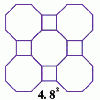
Schlafli tessellations
are somewhat mundane they do pose a demanding challenge in terms of 'elegant' LOGO procedures. This problem considers the eight semi-regular tessellations which pose a demanding challenge in terms of 'elegant' LOGO procedures.
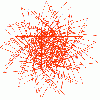
Spirals instead of sunflowers

LOGO challenge 7 - more stars and squares
Can you use LOGO to create a systematic reproduction of a basic design? An introduction to variables in a familiar setting.
First forward into Logo 6: variables and procedures
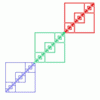
Learn to write procedures and build them into Logo programs. Learn to use variables.

First forward into Logo 7: angles of polygons
More Logo for beginners. Learn to calculate exterior angles and draw regular polygons using procedures and variables.
First forward into Logo 9: stars
Turn through bigger angles and draw stars with Logo.
First forward into Logo 8: more about variables
Write a Logo program, putting in variables, and see the effect when you change the variables.
LOGO challenge - circles as animals
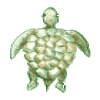
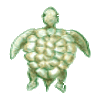
See if you can anticipate successive 'generations' of the two animals shown here.
LOGO challenge - circles as bugs
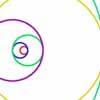
Here are some circle bugs to try to replicate with some elegant programming, plus some sequences generated elegantly in LOGO.
LOGO challenge - triangles-squares-stars
Can you recreate these designs? What are the basic units? What movement is required between each unit? Some elegant use of procedures will help - variables not essential.
LOGO challenge - tilings
Three examples of particular tilings of the plane, namely those where - NOT all corners of the tile are vertices of the tiling. You might like to produce an elegant program to replicate one or all of these.
LOGO challenge - the logic of LOGO
Just four procedures were used to produce a design. How was it done? Can you be systematic and elegant so that someone can follow your logic?
LOGO challenge - pentagram pylons
Pentagram Pylons - can you elegantly recreate them? Or, the European flag in LOGO - what poses the greater problem?
LOGO challenge - sequences and pentagrams
Explore this how this program produces the sequences it does. What are you controlling when you change the values of the variables?
Trees and friezes

LOGO challenge - following on
Remember that you want someone following behind you to see where you went. Can yo work out how these patterns were created and recreate them?
LOGO challenge - recollection
Several procedures to think about but there are several things you can do to help yourself such as breaking the procedures down stepwise (rather than into smaller peices) What does the first line do? And the second?...
LOGO challenge - trees
Recursion and the some beautiful results
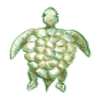
LOGO challenge - blob
Working with recursion. What is going on how does each iteration feen into the next? All within a geometric setting.

Spirostars
Spiroflowers