 Links to the NRICH website Home page

30 April (Primary), 1 May (Secondary)
Poly Plug Rectangles


Why do this problem?
Possible approach
Key questions
Possible extension
Learners could play a version of the game in pairs which allows diagonal rectangles too.
Possible support
Annotated videos
Clip 1 (above): We gave the children some time to play with the Poly Plugs as these were new to them. Not all used them to make patterns within the grid but almost everything was mathematical! There was a lot of noise, most of it productive, and our feeling was that if we hadn't given them this time, they would not have been so focused later on.
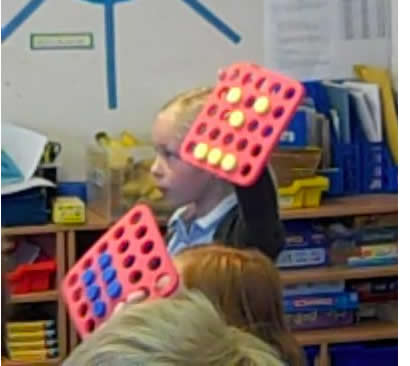 Picture 2: Having given them time to play freely, we then suggested they make any pattern or picture they like using just six plugs. We used this child's pattern to draw out the properties of a rectangle.
Clip 3 (above): We then introduced the class to the interactivity. (The interactiivty has since been updated so looks a little different now.) We made the mistake of using a rectangle of four plugs, rather than building on the work they'd just done using six plugs to make a rectangle. You can see the difference in their reactions in this clip and clip 4 which does use six plugs. We re-wrote these teachers' notes after this experience.
Clip 4 (above): In this clip, we encourage the children to find the rectangle more quickly and this time it contains six plugs.
Clip 5(above): We were keen that the children should share their thinking. It was interesting, but unsurprising, that they were disappointed when a plug turned blue.
Clip 6 (above): In this clip, we confronted their keenness to choose only positive examples, trying to help them to see that a blue plug could give them far more information than a yellow one. We're not sure we won though!
You may also like

Consecutive Numbers
An investigation involving adding and subtracting sets of consecutive numbers. Lots to find out, lots to explore.

Roll These Dice
Roll two red dice and a green dice. Add the two numbers on the red dice and take away the number on the green. What are all the different possible answers?