

First Forward Into Logo 1: Square Five


A Short introduction to using Logo. This is the first in a twelve part series.
Problem
First Forward Into Logo
This is the first in a twelve part series of articles introducing Logo programming for beginners. Even if you have never tried LOGO it is easy to learn and here is the place to get started! The programs in this article were written using MSWLogo and you can download this excellent free software from the internet at http://fmslogo.sourceforge.net/.
With only a limited set of instructions (i.e. primitives) it is usually quite straightforward to draw the most complex of shapes on the screen or to get the 'turtle' to manoeuvre about the floor.
For example, using instructions such as:
forward 40 (FD 40)
  or
backward 20 (BK 20),
right 85 (RT 85 )
   or
left 125 (LT 125)
The difficulty always seems to be about remembering to put spaces between the commands - FD, BK, RT, or LT and the amount of distance or turning you want the screen or floor turtle to achieve:
| Image

|
- How impatient did you become?
- How did you get round the difficulties you met?
- Did you share what you did with others?
- Did other people help you solve the challenge? In what ways?
- What happened when the instructions you had worked out did not draw the shape required?
The first LOGO Challenge
For now, a reminder of some of the PRIMITIVES (the commands) needed to start drawing:
FD forward        BK backward

LT left           RT right

PU pen up         PD pen down

HT hide turtle    ST show turtle

CS clear screen   CT clear text

Now FD to the first challenge...
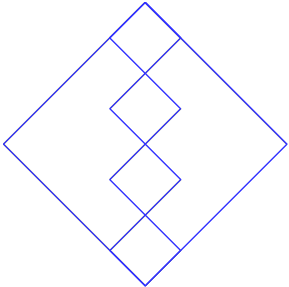
Can you use LOGO to draw the 5-square?
Next: FF2
Getting Started
Think of the overall picture as being made of:
a single length and turns of 45 degrees or 90 degrees
or
one large square and smaller squares, the lengths of whose sides you need to choose
or
small squares (you can draw one square, and the next, and the next, but where do you start each time?) and then the large square.
How about having a base length of 20 and start by turning through 45 degrees, something like:
RT 45
FD 20
FD 20
FD 20
FD 20
LT 90 ...
What am I drawing?
Student Solutions
Most of the Logo challenges do not have solutions because you will know that your program is correct if it draws the required shapes. In addition you could write different programs and still get the desired result.
In this case we give below a very simple program. It has has many repetitions and it could be made shorter and more elegant by using a REPEAT command which will be introduced in the next section. Here we give just a list of commands but we shall learn to give each short program its own name and to use that name as a command to start the program.
Note that the program is written here in small case letters rather than capitals and most LOGO software allows either. It is good practice to be consistent and stick to one or the other and we generally use capitals because they are easier to read.
rt 45 fd 20
lt 90 fd 40
rt 90 fd 40
lt 90 fd 40
rt 90 fd 20
rt 90 fd 20
rt 90 fd 40
lt 90 fd 40
rt 90 fd 40
lt 90 fd 20
lt 90 fd 80
lt 90 fd 80
lt 90 fd 80
lt 90 fd 80
lt 135